A year of running my development and testing environment on a UGREEN DXP4800 Plus taught me that the decisions that feel minor on setup day - which drives, how much RAM, Docker or a virtual machine, who watches the box - decide whether AI agents speed your business up or grind it to a halt. Here is what I would tell any business owner thinking about a NAS as their AI workbench, including the mistakes I paid for so you don't have to.
The short version of a year spent running AI agents against my own NAS.
- Spinning hard drives are excellent for storage and backups, and a poor fit for the constant small reads and writes that code, databases and agents generate.
- Budget for M.2 NVMe and SATA SSD storage from day one instead of adding it after the slowdowns start.
- Check what you already own before buying anything - two of my three fixes cost nothing.
- Docker and virtual machines solve different problems, and the right choice depends on isolation, RAM, hardware access and how closely you need to mirror production.
- The biggest lesson was organizational, not technical: build an agent team with clear roles, and stay the manager of it.
Back in February I wrote about turning my UGREEN NAS into a dev server so my AI experiments stopped breaking my live sites. That part worked. What I didn't understand yet was how differently an AI agent uses a machine compared to a person, and how quickly that difference exposes every shortcut you took when you set the box up.
Slow Hard Drives Are Great for Backups and Terrible for AI Agents Writing Code
My DXP4800 Plus stores everything on three 12TB Toshiba hard drives in RAID 5. For storage and backups, that setup is great. For a development server, it turned into the bottleneck.
A person clicking around a test site touches a handful of files. An agent runs a search across the whole disk, spins up several helper agents in parallel, opens a browser, rebuilds a package and queries a database, often all at once. Those are sustained, I/O-heavy bursts, and mechanical drives answer them one seek at a time.

Oolong Tea Vs Green Tea Which Is A Better Choice For Men's Health
Comparison of the health benefits of Oolong Tea vs Green Tea and which is better for men's health.

What Is The Best Tea To Help Cure Hangover Symptoms
Tea for hangover relief: Target nausea, headaches, and dehydration naturally. Ginger, peppermint, and chamomile blends provide therapeutic benefits. Essential guidance for men seeking effective recovery.

Chai Tea Vs Green Tea: Comparing Health Benefits
Let's compare the differences between Chai Tea and Green Tea.
Promoted by FlowAds
Buy Tea tea sales site

By September the Ubuntu virtual machine that hosts my test environment - 20 Joomla development sites, two database engines and 14 Node apps - had 2.9 GB of RAM and was swapping constantly. The processor spent 44 to 45 percent of its time waiting on the disks. A nearly empty test site serving an 11KB page took 8 seconds to load. Nothing was wrong with that site. The machine was starved.
I have a few small, older SSDs I recovered from other machines installed in the box, but they still aren't fully configured. The more work I do, the clearer it gets that the slower Toshiba platter drives just aren't the right fit for long-term use in a setup like this, and anyone starting from scratch would be much better off doing it right from the beginning. Put the virtual machine, databases and active projects on M.2 NVMe storage, use SATA SSDs for working files, and keep the large hard drives for what they do best: bulk storage and backups.
Fix What You Already Own Before You Buy More Hardware
Before spending anything, Atlas, the infrastructure agent I describe below, measured the box and found two problems that cost nothing to fix. The Ubuntu installer had left 98 GB of the virtual disk unallocated since the day the machine was built, and 21.8 GB of orphaned backups were sitting outside any retention policy. Extending the filesystem took two commands with no downtime, and clearing the old backups was just as quick.
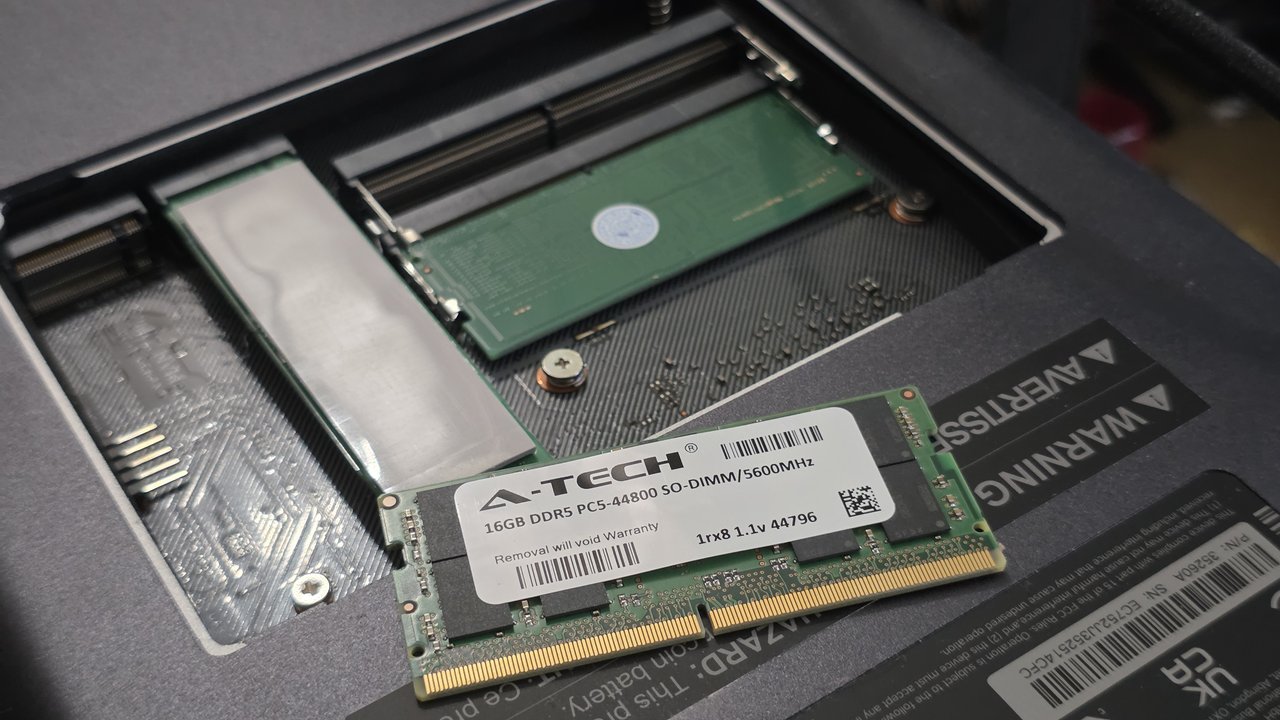
The one paid fix was memory. I added a 16GB DDR5 laptop-style memory module to the NAS's empty second slot, taking it from 8GB to 24GB, which let the virtual machine grow from 3GB to 12GB. DDR5 prices have risen sharply, so check current pricing before you buy rather than trusting an older number you find online.
The results on the same machine, with the same tests:
- Swap use dropped from more than 2 GB to zero.
- Time spent waiting on the disks fell from about 44 percent to about 1 percent.
- The empty test site went from 8.02 seconds to 0.135 seconds.
- One site that never loaded inside 60 seconds now loads in 0.145 seconds.
The process held a lesson too. The first test after the upgrade looked worse than before, because a freshly rebooted machine with empty caches was being compared against one that had been running for 90 days. The second, warm test showed the real numbers. Measure twice, and know which state you are measuring before you celebrate or panic.
Docker or a Virtual Machine: How To Choose the Right Setup for Your Organization
I use both, for different situations. Docker is easier to set up, but neither one is better in general, and the answer changes with the hardware. A business owner looking at a NAS for their organization can make the call by working through five questions.
How much isolation does this workload need?
A Docker container shares the NAS's own operating system kernel. That makes containers light and fast, and it also means that, in some configurations, a serious flaw exploited inside a container can reach the system that holds all your files. A virtual machine runs its own complete operating system, which puts a stronger wall between the workload and your storage. Anything internet-facing, anything running code you didn't write, and anything an AI agent has free rein over is a strong candidate for a virtual machine.
How much RAM can you spare?
Containers typically use memory as they need it. A virtual machine typically reserves its RAM up front, whether it is busy or not. That reservation is part of why a small virtual machine on a NAS with little memory runs out of room fast. If you plan on a virtual machine, buy the RAM for it before you build it.
Does the workload need the GPU, a USB device or a sensor?
Hardware access is the question with no universal answer, because it depends on the NAS, the processor and the vendor's software. The same job looks different on my DXP4800 Plus development box than it does on FlowBrain, the UGREEN iDX6011 Pro I use for local AI work, where reaching the GPU is the whole point. It would change again on a NAS from another manufacturer.
Containers generally reach graphics chips, USB devices and sensors through the host's own drivers, and several containers can share one device. Passing hardware through to a virtual machine usually dedicates the whole device to that one machine, and support varies widely between platforms and software versions. Before you design around a GPU, a USB device or a specialty sensor, confirm what your exact model and operating system version support, and test it before you build anything on top of it.
Do you need to mirror your production server?
My live sites run on a Linux server, so my test environment runs in an Ubuntu virtual machine that is much closer to production than a container on the NAS would be. It isn't a perfect copy, but it catches most problems before they reach a live site. If you are testing changes to an existing server, a virtual machine is the closer match.
How fast do you need to roll back?
Docker is easier to set up and quicker to throw away and rebuild. On most platforms, a virtual machine gives you snapshots of the entire system, so when an agent breaks something badly, you restore the whole machine to yesterday in minutes. For a sandbox where agents experiment, that safety net is worth the extra setup.
Plan Security and Maintenance Before an Agent or a Fire Forces You To
Every release we ship gets a security review from Sentinel, our security agent, and an infrastructure review from Atlas, along with specialized review skills and checks by outside, third-party AI models. We run audits at a similar level across our infrastructure on a regular schedule, and when we find problems in software we use, we send the reports to the companies that make it.
With vendor software we bought but chose not to keep paying subscriptions for, getting a fix has been harder than fixing it ourselves, so we have forked those products and moved forward with our own fixes. That is why I'm such a strong supporter of open source, open-weight models and a software version of the right to repair, along with making it easy for anyone to report a vulnerability.
In my experience, some commercial AI models, including Claude, have restrictive cybersecurity policies. When a model refuses to help a system owner test and patch their own software, I end up doing that security work with models like DeepSeek and GLM instead. There is a thin line between malicious hacking and an administrator fixing hardware and software they already own, and I worry it will get harder to walk as these rules extend to devices like TVs and routers.
Backups get the same planning. Our code lives on GitHub, and sites and repositories are backed up locally and to a second machine at a different location. That way an agent gone rogue, a hardware failure or a fire at the office doesn't take everything with it.
How Atlas Fits In: Give Your Infrastructure Its Own Agent
Atlas is a Claude Code agent with one job: my infrastructure. Atlas fixes website problems, compares AI models, reviews technical documentation for those tasks and builds the workflows that take an app from release candidate to published.
Atlas doesn't work alone. I designed my operations team around roles, and each agent has a defined job and a personality that has evolved over time. Sentinel handles security and optimization. Flow is the project manager. Cortex is the lead architect when it runs as orchestrator and a coder when it runs as builder. Those are roles assigned at the start of a task, so an orchestrator can manage a project team that includes separate Cortex builders working from its instructions.
A year ago the models allowed more conversation and personality. Today they are much more direct and efficient. Being able to joke around is something I can add back through how I configure each agent.
Build the Team Before You Buy the Hardware
The NAS taught me about drives and memory, but the lesson that changed my business was about people and roles. Start by building your agent team. Draw the org chart, including agents that do the work and advisors whose job is to push back on your ideas. It's essential that you as a human stay core to the process, but that means managing your team, not just delegating to it.
Write a short role card for each agent before its first task: what it owns, what it must never touch and who reviews its work.
About the Author: James Hills is the founder of FlowMediaMarketing.com and runs a network of travel and lifestyle publications including ManTripping.com and CruiseWestCoast.com, built and maintained with a team of AI agents running on hardware he owns. For media inquiries on AI infrastructure and agent teams for small businesses, contact James at FlowMediaMarketing.com.